By Will Tygart · Published November 27, 2026 · Operational Resilience Opinion
Direct Answer: Direct API keys and Zapier-style webhooks turn third-party AI incidents into an all-or-nothing shutdown choice. Decoupling external AI inside a $7/month sacrificial Google Workspace blast-zone seat with an asynchronous Sheet or Drive queue lets continuity teams sever a compromised AI vendor in under 60 seconds without taking internal operations dark.
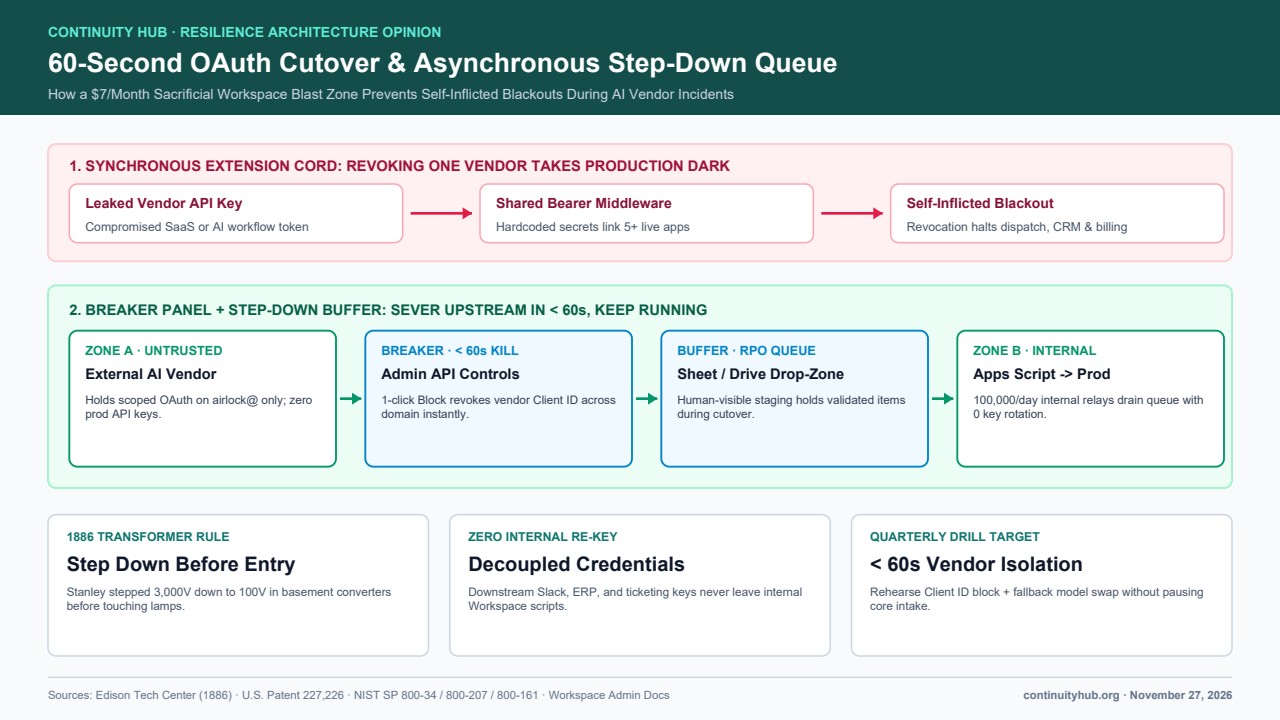
Two weeks ago, in our continuity analysis on revoking a compromised AI key, we laid out the ugliest dilemma an operations lead can face during a security incident: either leave a leaked API key running while an attacker drains your account, or pull the plug and watch your own intake, triage, and dispatch queues go dark. If that scenario hits uncomfortably close to home, here is my blunt diagnosis: the problem is rarely the model vendor. The problem is that you wired an external service straight into production with an extension cord instead of a breaker panel.
As we explored in whether your continuity plan survives the vendor itself failing and supply-chain vendor incidents, point-to-point bearer tokens create invisible single points of failure. Every time an integration tool stores live production secrets for Slack, your ticketing desk, and your billing database just to pass AI summaries between them, you bind your internal recovery time objective (RTO) to every outside startup in the chain.
The 1886 Step-Down Rule: Never Bring Trunk Voltage to the Workbench
Electrical engineers solved this exact topology problem in March 1886. In Great Barrington, Massachusetts, William Stanley Jr. and George Westinghouse needed 500V to 3,000V alternating current on the street trunk to move power efficiently—but bringing trunk voltage straight to shop switches would have destroyed equipment and killed operators. Stanley placed induction-coil step-down transformers inside Main Street basements to drop line voltage to 100V before entering any interior circuit, while Edison's enclosed lead-wire fuse (US227226) gave every branch a cheap, replaceable break point.
Think of frontier AI and external SaaS agents as 3,000V trunk power. You want that raw horsepower outside the building, and you never want it wired directly onto your internal production bus. Putting a $7/month sacrificial Google Workspace seat (airlock@company.com) between external AI and your internal systems creates both Stanley’s basement step-down buffer and Edison’s sacrificial fuse in one place.
| Grid / Continuity Principle | 1886 Step-Down Architecture | Direct AI Extension-Cord Failure | Sacrificial OAuth Blast-Zone Control |
|---|---|---|---|
| Voltage / Trust Isolation | William Stanley stepped 500V–3,000V down to 100V in basement converters | External AI agents write straight into ERP, Slack, or ticketing APIs | External AI writes only to a $7/mo airlock seat (30 GB shell, 0 legacy files) |
| Sacrificial Break Point | Edison US227226 enclosed lead wire melts inside protective tube | Revoking a leaked shared API key halts five internal production queues | Block one OAuth Client ID in Admin Console; internal scripts stay online |
| Asynchronous Buffer (RPO) | Substation isolation prevents feeder faults from blacking out the block | Synchronous webhooks drop requests mid-flight during vendor outages | Append-only Google Sheet / Drive intake folder buffers state safely |
| Failover & Recovery (RTO) | Modular branch circuits restore safely section by section | Emergency key rotation breaks hardcoded connectors across 12 SaaS apps | 100,000/day Apps Script pulls validated payloads into internal queues |
Separating Zone A (Untrusted AI) From Zone B (Internal Operations)
In a clean NIST SP 800-207 Zero Trust continuity design, external AI vendors sit strictly in Zone A. They receive scoped OAuth access (such as per-file drive.file permissions) on the dedicated $7/mo airlock seat—a 30 GB staging shell containing zero historical files and zero downstream CRM or ERP API keys. Those external tools drop candidate summaries, triage tags, or draft outputs into a Shared Drive folder or append-only Google Sheet queue, vetted under App Defense Alliance CASA scope standards.
Your internal operations live in Zone B. Using Google Apps Script (100,000 UrlFetchApp calls per day on Workspace), deterministic internal scripts read validated records from that buffer Sheet or Drive folder and push them into Slack, ticketing, or dispatch. The upstream AI vendor never sees your internal webhook URLs or database credentials—and if a vendor fails or hallucinates malformed output, payloads wait safely in an inspectable human-readable queue instead of corrupting live production tables.
The 60-Second Emergency Cutover Without Taking Operations Dark
Look at what changes during an actual security or vendor outage under NIST SP 800-34 contingency planning and NIST SP 800-161 supply-chain risk controls. If an external AI vendor suffers a breach or triggers anomalous writes, your administrator opens Workspace Admin API controls and switches that single OAuth Client ID to Blocked. Every active token for that vendor revokes across the domain in under sixty seconds. Meanwhile, Zone B internal Apps Script relays keep draining every validated item already sitting in the step-down queue—with zero emergency secret rotation across five downstream apps and zero self-inflicted operational blackout. Even better, your staff can open the airlock Sheet in any browser, see the exact last timestamped record that crossed from Zone A to Zone B, and switch intake to a pre-staged backup model without guessing what went missing mid-flight.
| Continuity Tabletop Stage | Direct-Key Architecture (High RTO) | Sacrificial OAuth Blast Zone (< 60s Cutover) | NIST Continuity Anchor |
|---|---|---|---|
| T+00:00 · Vendor Breach Alert | Incident commander debates revenue halt vs. leaving key live | Admin opens Security > API Controls > Manage Third-Party App Access | NIST SP 800-34 Contingency Detection |
| T+00:45 · Emergency Severance | Must find every script/Zapier task holding the leaked bearer key | Toggle vendor Client ID to Blocked; active OAuth tokens revoke globally | NIST SP 800-207 Zero Trust Enforcement |
| T+05:00 · Queue Continuity | Downstream CRM, dispatch, and billing workflows stall simultaneously | Internal Apps Script drains validated rows already in Sheet/Drive buffer | NIST SP 800-161 Supply Chain Resilience |
| T+30:00 · Controlled Restoration | Manual credential re-keying and untested webhook replay across apps | Switch intake seat to backup AI provider; replay quarantined files cleanly | 100,000/day Apps Script Queue Replay |
Four Steps to Rehearse Before Your Next Tabletop Exercise
- 1. Move external AI integrations off human admin seats: Route third-party AI agents strictly through one $7/mo sacrificial intake identity.
- 2. Replace synchronous webhooks with an append-only buffer: Require outside AI workflows to write candidate outputs to a staged Drive folder or Sheet rather than calling internal production APIs directly.
- 3. Isolate downstream production keys inside Zone B scripts: Store internal CRM, Slack, and dispatch credentials inside internal Apps Script properties that Zone A OAuth tokens cannot read.
- 4. Time a live OAuth Client ID block drill quarterly: Confirm an on-call responder can sever a test AI integration in under 60 seconds while internal intake and manual queue processing continue uninterrupted.
Frequently Asked Questions
Why does revoking a single compromised AI key often black out unrelated operations?
When teams wire Zapier webhooks or shared bearer API keys straight from AI vendors into internal tools, one secret powers multiple downstream automations. Pulling that key to stop an intrusion immediately breaks every connected workflow until new keys are re-plumbed.
How does a sacrificial Google Workspace seat create an asynchronous RPO buffer?
External AI tools drop structured outputs into a scoped Drive folder or Google Sheet on the $7/month airlock seat. Internal Apps Script relays poll and validate those queued items before pushing them into production, so internal systems keep running even when the upstream AI connection is cut.
How fast can an administrator sever a compromised OAuth AI integration in Google Workspace?
Inside the Workspace Admin Console under Security > API controls > Manage Third-Party App Access, switching an application to Blocked revokes existing OAuth tokens and halts new grants across the domain immediately without touching downstream internal credentials.
Does Google Workspace eliminate single-provider outage risk by itself?
No. Google is your isolation breaker panel and staging buffer, not a magic zero-outage guarantee. Resilient plans per NIST SP 800-34 still maintain offline exports, manual intake fallbacks, and pre-staged secondary model providers for prolonged cloud disruptions.
Primary Verification Sources
- Edison Tech Center — William Stanley's 1886 Step-Down Transformer
- U.S. Patent 227,226 — Edison Safety-Conductor Enclosed Fuse (1880)
- NIST SP 800-34 Rev. 1 — Contingency Planning Guide for Federal Information Systems
- NIST SP 800-207 — Zero Trust Architecture
- NIST SP 800-161 Rev. 1 — Cybersecurity Supply Chain Risk Management
- Google Workspace Admin Help — Block or Restrict Third-Party App Access
- Google Apps Script — Service Quotas & Daily Trigger Limits
- Google Drive API — Per-File drive.file Scope Isolation
- App Defense Alliance — CASA Annual Assessment Standard